Server rendering
A banner that arrives before the JavaScript
The season's banner plays its entrance from the first paint, whether the JavaScript is late or never comes.
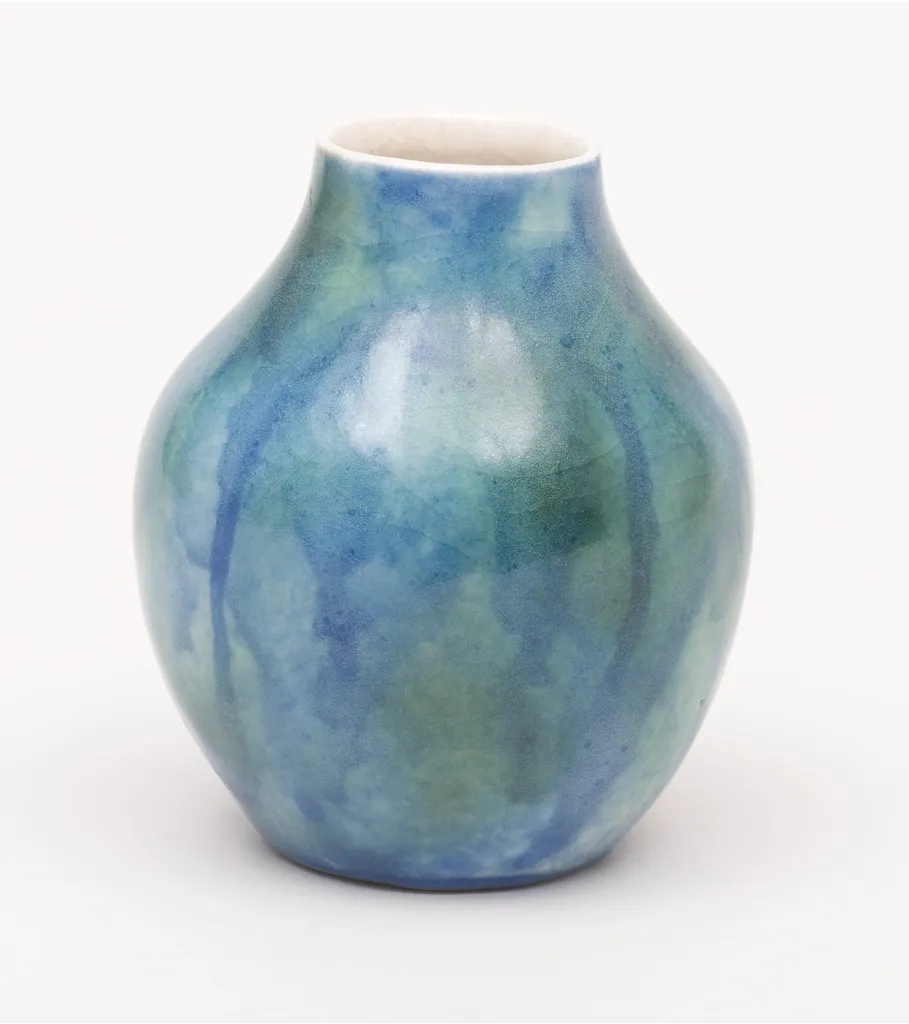
New this season
Glazes that ran in the kiln
Two glazes poured over each other, left to find their own way in the heat. No two came out alike.
See the piecesWaiting for the JavaScript…
Reduced motion: The photo and lines still fade in one after another, but nothing rises or settles. Before the JavaScript, the page's CSS follows your system's reduced-motion setting; the header's switch counts once the JavaScript has run.
Why
A server-rendered page is on screen before its JavaScript has loaded. An entrance that waits for the JavaScript waits on the network: the banner sits blank, then starts late, or never with the JavaScript off. Wardic writes each element's entrance into the page as a CSS animation, sampled from the same spring or tween the browser would run, so the banner moves from the first paint, from the HTML and its stylesheet alone.
When the JavaScript arrives, Wardic takes each element over from where its CSS has drawn it, by the time that has passed, and carries on with the same spring: no jump, mid-flight or after the end. With no JavaScript, the CSS plays to the end and holds. There's nothing to turn on: every initial and animate on a server-rendered page gets one, variants and their stagger included.
Try it with the links under the banner. "Hydrate 2 s late" holds the JavaScript back, as a slow network would, and "Don't hydrate" never runs it, as with the JavaScript off. The line above them says when the JavaScript took over.
The code
The code is the same; what the server sends isn't. Motion renders each element at its initial on the server, and starts the entrance once React has hydrated the page: until the JavaScript has loaded, the banner is blank, and with no JavaScript it stays that way. Try the links on Motion's page: held back 2 s, its banner starts at 2 s. Motion's nearest is its optimised appear animations (startOptimizedAppearAnimation), made for Framer's sites, which need an inline script of your own to start them, and do nothing without JavaScript.
import { useLocation } from "@solidjs/router"
import { type Hydration, hydrationOf } from "@wardic/example-storefront-shared/hydration"
import { photoOf, srcsetOf } from "@wardic/example-storefront-shared/images"
import { wardic } from "@wardic/solid"
import { createSignal, onMount, Show } from "solid-js"

// The banner names a variant; its photo and lines follow, one after another. Nothing here asks for
// the server: Wardic writes this entrance into the page's CSS, so it plays from the first paint.
const banner = {
  hidden: {},
  shown: { transition: { staggerChildren: 0.12, delayChildren: 0.1 } },
}

const photo = {
  hidden: { opacity: 0, scale: 1.12 },
  shown: { opacity: 1, scale: 1, transition: { duration: 1.6, ease: "easeOut" } },
} as const

const line = {
  hidden: { opacity: 0, y: 18 },
  shown: { opacity: 1, y: 0, transition: { type: "spring", stiffness: 140, damping: 20 } },
} as const

const vase = photoOf("lagoon-vase")

/** When the JavaScript took over, in ms from the page's start: once, so a replay keeps it. */
let tookOver: number | undefined

/** What the server says is coming, before the JavaScript arrives. */
const waiting = (hydration: Hydration): string => {
  if (hydration.kind === "off") return "No JavaScript on this page: what moved is the server's HTML and CSS alone."
  if (hydration.kind === "late") return `Waiting for the JavaScript, held back ${hydration.ms / 1000} s…`
  return "Waiting for the JavaScript…"
}

/** What the JavaScript is doing: the server says what's coming, the browser when it arrived. */
function HydrationStatus() {
  const location = useLocation()
  const [at, setAt] = createSignal(tookOver)
  onMount(() => {
    tookOver ??= Math.round(performance.now())
    setAt(tookOver)
  })
  return (
    <p class="hydration-status" role="status">
      <Show when={at()} fallback={waiting(hydrationOf(new URLSearchParams(location.search).get("hydrate")))}>
        {(ms) => <>The JavaScript took over at {ms()} ms; the banner had been moving since the first paint.</>}
      </Show>
    </p>
  )
}

export default function BeforeHydration() {
  return (
    <>
      <wardic.section class="season" variants={banner} initial="hidden" animate="shown">
        <div class="season-photo">
          <wardic.img variants={photo} src={vase.large} srcset={srcsetOf(vase)} sizes="(max-width: 640px) 100vw, 480px" width={vase.width} height={vase.height} alt="The Lagoon Vase" />
        </div>
        <div class="season-copy">
          <wardic.p class="eyebrow" variants={line}>
            New this season
          </wardic.p>
          <wardic.h2 variants={line}>Glazes that ran in the kiln</wardic.h2>
          <wardic.p variants={line}>Two glazes poured over each other, left to find their own way in the heat. No two came out alike.</wardic.p>
          <wardic.a class="button accent" href="/entrances/product-grid" variants={line} whileHover={{ y: -2 }} whileTap={{ scale: 0.97 }}>
            See the pieces
          </wardic.a>
        </div>
      </wardic.section>
      <div class="hydration">
        <HydrationStatus />
        {/* Full page loads, not the router's: `rel="external"`. */}
        <nav class="hydration-links" aria-label="Load this page again">
          <a class="button quiet" rel="external" href="/server/before-hydration?hydrate=2000">
            Hydrate 2 s late
          </a>
          <a class="button quiet" rel="external" href="/server/before-hydration?hydrate=off">
            Don't hydrate
          </a>
          <a class="button quiet" rel="external" href="/server/before-hydration">
            Hydrate at once
          </a>
        </nav>
      </div>
    </>
  )
}
"use client"
import { type Hydration, hydrationOf } from "@wardic/example-storefront-shared/hydration"
import { photoOf, srcsetOf } from "@wardic/example-storefront-shared/images"
import { motion } from "motion/react"
import { useSearchParams } from "next/navigation"
import { useEffect, useState } from "react"
// The banner names a variant; its photo and lines follow, one after another. The server sends each
// element at its `initial`, and Motion starts the entrance once React has hydrated the page: until
// then the banner is blank, and with no JavaScript it stays that way.
const banner = {
hidden: {},
shown: { transition: { staggerChildren: 0.12, delayChildren: 0.1 } },
}
const photo = {
hidden: { opacity: 0, scale: 1.12 },
shown: { opacity: 1, scale: 1, transition: { duration: 1.6, ease: "easeOut" } },
} as const
const line = {
hidden: { opacity: 0, y: 18 },
shown: { opacity: 1, y: 0, transition: { type: "spring", stiffness: 140, damping: 20 } },
} as const
const vase = photoOf("lagoon-vase")
/** When the JavaScript took over, in ms from the page's start: once, so a replay keeps it. */
let tookOver: number | undefined
/** What the server says is coming, before the JavaScript arrives. */
const waiting = (hydration: Hydration): string => {
if (hydration.kind === "off") return "No JavaScript on this page: what you see is the server's HTML and CSS alone."
if (hydration.kind === "late") return `Waiting for the JavaScript, held back ${hydration.ms / 1000} s…`
return "Waiting for the JavaScript…"
}
/** What the JavaScript is doing: the server says what's coming, the browser when it arrived. */
function HydrationStatus() {
const search = useSearchParams()
const [at, setAt] = useState(tookOver)
useEffect(() => {
tookOver ??= Math.round(performance.now())
setAt(tookOver)
}, [])
return (
<p className="hydration-status" role="status">
{at === undefined ? waiting(hydrationOf(search.get("hydrate"))) : <>The JavaScript took over at {at} ms; the banner started then.</>}
</p>
)
}
export default function BeforeHydration() {
return (
<>
<motion.section className="season" variants={banner} initial="hidden" animate="shown">
<div className="season-photo">
<motion.img variants={photo} src={vase.large} srcSet={srcsetOf(vase)} sizes="(max-width: 640px) 100vw, 480px" width={vase.width} height={vase.height} alt="The Lagoon Vase" />
</div>
<div className="season-copy">
<motion.p className="eyebrow" variants={line}>
New this season
</motion.p>
<motion.h2 variants={line}>Glazes that ran in the kiln</motion.h2>
<motion.p variants={line}>Two glazes poured over each other, left to find their own way in the heat. No two came out alike.</motion.p>
<motion.a className="button accent" href="/entrances/product-grid" variants={line} whileHover={{ y: -2 }} whileTap={{ scale: 0.97 }}>
See the pieces
</motion.a>
</div>
</motion.section>
<div className="hydration">
<HydrationStatus />
{/* Full page loads, not the router's: plain links. */}
<nav className="hydration-links" aria-label="Load this page again">
<a className="button quiet" href="/server/before-hydration?hydrate=2000">
Hydrate 2 s late
</a>
<a className="button quiet" href="/server/before-hydration?hydrate=off">
Don't hydrate
</a>
<a className="button quiet" href="/server/before-hydration">
Hydrate at once
</a>
</nav>
</div>
</>
)
}