Presence
A quick view whose list leaves before it
Open a piece in a quick view and dismiss the suggestions you don't want. Close it, and what's left of the list goes first.
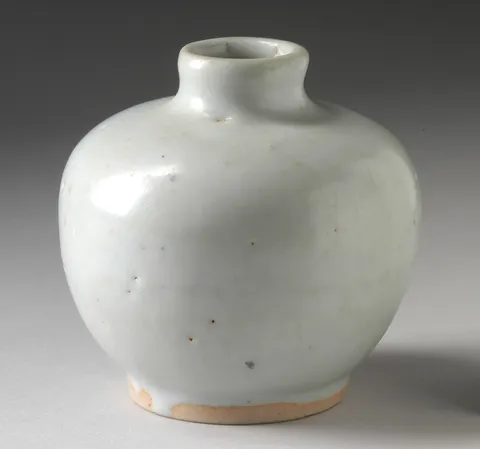 Moon Vase$148
 Faceted Carafe$120
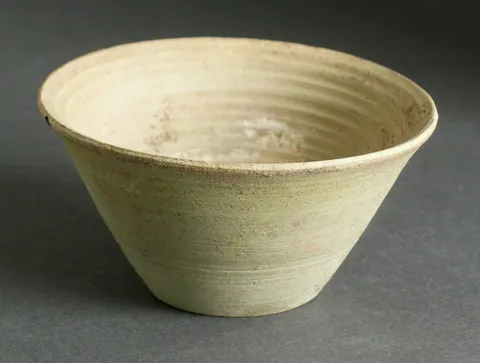 Celadon Cone Bowl$58
Reduced motion: The dialog and its suggestions fade in and out; nothing slides or grows.
Why
A dialog with a list in it is two things leaving when it closes. If the list vanishes with the dialog, the rows you were reading are gone in a frame, and the dialog fades out around nothing. Better: the rows go first, the dialog after.
The suggestions are a presence of their own, since each can be dismissed by itself with "Not for me". Given propagate, that presence answers to the one around the dialog: when the dialog leaves, every suggestion still there leaves too, each running its exit, and the dialog stays until they've gone. The dialog's own exit waits a moment, so the list visibly goes first. Without propagate, a nested presence's children go with their parent as they are.
Close it with ✕, Escape, or a click outside.
The code
import { PRODUCTS } from "@wardic/example-storefront-shared/catalog"
import { formatPrice } from "@wardic/example-storefront-shared/format"
import { photoOf, srcsetOf } from "@wardic/example-storefront-shared/images"
import type { Product } from "@wardic/example-storefront-shared/server"
import { AnimatePresence, wardic } from "@wardic/solid"
import { createSignal, For, onCleanup, onMount, Show } from "solid-js"

const SHELF = PRODUCTS.filter((product) => ["moon-vase", "celadon-bowl", "cut-carafe"].includes(product.id))

/** Three pieces from other shelves, to go with one. */
const pairingsOf = (piece: Product): ReadonlyArray<Product> => PRODUCTS.filter((other) => other.category !== piece.category).slice(0, 3)

// The suggestions slide in after the panel, and out before it: the panel's exit waits a moment, so
// the list visibly goes first.
const panel = {
  initial: { opacity: 0, y: 24, scale: 0.97 },
  animate: { opacity: 1, y: 0, scale: 1 },
  exit: { opacity: 0, y: 16, scale: 0.97, transition: { type: "tween", duration: 0.2, delay: 0.16 } },
} as const

const pairing = {
  initial: { opacity: 0, x: 16 },
  animate: { opacity: 1, x: 0, transition: { type: "spring", stiffness: 300, damping: 26, delay: 0.12 } },
  exit: { opacity: 0, x: -16, transition: { type: "tween", duration: 0.16 } },
} as const

export default function QuickView() {
  const [open, setOpen] = createSignal<Product>()
  const close = () => setOpen(undefined)

  onMount(() => {
    const onKey = (event: KeyboardEvent) => {
      if (event.key === "Escape") close()
    }
    window.addEventListener("keydown", onKey)
    onCleanup(() => window.removeEventListener("keydown", onKey))
  })

  return (
    <>
      <ul class="shelf">
        <For each={SHELF}>
          {(product) => {
            const photo = photoOf(product.id)
            return (
              <li class="shelf-item">
                <div class="photo">
                  <img src={photo.small} srcset={srcsetOf(photo)} sizes="160px" width={photo.width} height={photo.height} alt={product.name} />
                </div>
                <div class="line">
                  <span class="name">{product.name}</span>
                  <span class="price">{formatPrice(product.price)}</span>
                </div>
                <wardic.button class="button quiet" whileHover={{ y: -1 }} whileTap={{ scale: 0.96 }} onClick={() => setOpen(product)}>
                  Quick view
                </wardic.button>
              </li>
            )
          }}
        </For>
      </ul>
      <AnimatePresence>
        <Show when={open()} keyed>
          {(piece) => (
            <>
              <wardic.div class="backdrop" initial={{ opacity: 0 }} animate={{ opacity: 1 }} exit={{ opacity: 0, transition: { delay: 0.16 } }} onClick={close} />
              <div class="detail-frame">
                <wardic.article class="quick-view" role="dialog" aria-modal="true" aria-label={piece.name} {...panel}>
                  <QuickViewBody piece={piece} onClose={close} />
                </wardic.article>
              </div>
            </>
          )}
        </Show>
      </AnimatePresence>
    </>
  )
}

function QuickViewBody(props: { readonly piece: Product; readonly onClose: () => void }) {
  const photo = photoOf(props.piece.id)
  // "Not for me" takes a suggestion out of the list, which is why the list is a presence of its own.
  const [dismissed, setDismissed] = createSignal<ReadonlyArray<string>>([])
  const shown = () => pairingsOf(props.piece).filter((other) => !dismissed().includes(other.id))
  return (
    <>
      <div class="photo">
        <img src={photo.small} srcset={srcsetOf(photo)} sizes="200px" width={photo.width} height={photo.height} alt={props.piece.name} />
      </div>
      <div class="quick-view-body">
        <h2 class="name">{props.piece.name}</h2>
        <p class="price">{formatPrice(props.piece.price)}</p>
        <p class="muted">{props.piece.description}</p>
        <h3>Pairs well with</h3>
        <ul class="pairings">
          {/* propagate: when the dialog goes, these leave first, each running its exit, and the
              dialog waits for them. Without it, they'd vanish with it. */}
          <AnimatePresence propagate>
            <For each={shown()}>
              {(other) => (
                <wardic.li class="pairing" layout {...pairing}>
                  <img src={photoOf(other.id).small} width="40" height="40" alt="" />
                  <span class="name">{other.name}</span>
                  <span class="price">{formatPrice(other.price)}</span>
                  <button class="icon-button" aria-label={`Not for me: ${other.name}`} onClick={() => setDismissed([...dismissed(), other.id])}>
                    ✕
                  </button>
                </wardic.li>
              )}
            </For>
          </AnimatePresence>
        </ul>
      </div>
      <button class="icon-button close" onClick={() => props.onClose()} aria-label="Close">
        ✕
      </button>
    </>
  )
}
"use client"
import { PRODUCTS } from "@wardic/example-storefront-shared/catalog"
import { formatPrice } from "@wardic/example-storefront-shared/format"
import { photoOf, srcsetOf } from "@wardic/example-storefront-shared/images"
import type { Product } from "@wardic/example-storefront-shared/server"
import { AnimatePresence, motion } from "motion/react"
import { useEffect, useState } from "react"

const SHELF = PRODUCTS.filter((product) => ["moon-vase", "celadon-bowl", "cut-carafe"].includes(product.id))

/** Three pieces from other shelves, to go with one. */
const pairingsOf = (piece: Product): ReadonlyArray<Product> => PRODUCTS.filter((other) => other.category !== piece.category).slice(0, 3)

// The suggestions slide in after the panel, and out before it: the panel's exit waits a moment, so
// the list visibly goes first.
const panel = {
  initial: { opacity: 0, y: 24, scale: 0.97 },
  animate: { opacity: 1, y: 0, scale: 1 },
  exit: { opacity: 0, y: 16, scale: 0.97, transition: { type: "tween", duration: 0.2, delay: 0.16 } },
} as const

const pairing = {
  initial: { opacity: 0, x: 16 },
  animate: { opacity: 1, x: 0, transition: { type: "spring", stiffness: 300, damping: 26, delay: 0.12 } },
  exit: { opacity: 0, x: -16, transition: { type: "tween", duration: 0.16 } },
} as const

export default function QuickView() {
  const [open, setOpen] = useState<Product | null>(null)
  const close = () => setOpen(null)

  useEffect(() => {
    const onKey = (event: KeyboardEvent) => {
      if (event.key === "Escape") close()
    }
    window.addEventListener("keydown", onKey)
    return () => window.removeEventListener("keydown", onKey)
  }, [])

  return (
    <>
      <ul className="shelf">
        {SHELF.map((product) => {
          const photo = photoOf(product.id)
          return (
            <li key={product.id} className="shelf-item">
              <div className="photo">
                <img src={photo.small} srcSet={srcsetOf(photo)} sizes="160px" width={photo.width} height={photo.height} alt={product.name} />
              </div>
              <div className="line">
                <span className="name">{product.name}</span>
                <span className="price">{formatPrice(product.price)}</span>
              </div>
              <motion.button className="button quiet" whileHover={{ y: -1 }} whileTap={{ scale: 0.96 }} onClick={() => setOpen(product)}>
                Quick view
              </motion.button>
            </li>
          )
        })}
      </ul>
      <AnimatePresence>
        {open && <motion.div key="backdrop" className="backdrop" initial={{ opacity: 0 }} animate={{ opacity: 1 }} exit={{ opacity: 0, transition: { delay: 0.16 } }} onClick={close} />}
        {open && (
          <div key={open.id} className="detail-frame">
            <motion.article className="quick-view" role="dialog" aria-modal="true" aria-label={open.name} {...panel}>
              <QuickViewBody piece={open} onClose={close} />
            </motion.article>
          </div>
        )}
      </AnimatePresence>
    </>
  )
}

function QuickViewBody({ piece, onClose }: { readonly piece: Product; readonly onClose: () => void }) {
  const photo = photoOf(piece.id)
  // "Not for me" takes a suggestion out of the list, which is why the list is a presence of its own.
  const [dismissed, setDismissed] = useState<ReadonlyArray<string>>([])
  const shown = pairingsOf(piece).filter((other) => !dismissed.includes(other.id))
  return (
    <>
      <div className="photo">
        <img src={photo.small} srcSet={srcsetOf(photo)} sizes="200px" width={photo.width} height={photo.height} alt={piece.name} />
      </div>
      <div className="quick-view-body">
        <h2 className="name">{piece.name}</h2>
        <p className="price">{formatPrice(piece.price)}</p>
        <p className="muted">{piece.description}</p>
        <h3>Pairs well with</h3>
        <ul className="pairings">
          {/* propagate: when the dialog goes, these leave first, each running its exit, and the
              dialog waits for them. Without it, they'd vanish with it. */}
          <AnimatePresence propagate>
            {shown.map((other) => (
              <motion.li key={other.id} className="pairing" layout {...pairing}>
                <img src={photoOf(other.id).small} width="40" height="40" alt="" />
                <span className="name">{other.name}</span>
                <span className="price">{formatPrice(other.price)}</span>
                <button className="icon-button" aria-label={`Not for me: ${other.name}`} onClick={() => setDismissed([...dismissed, other.id])}>
                  ✕
                </button>
              </motion.li>
            ))}
          </AnimatePresence>
        </ul>
      </div>
      <button className="icon-button close" onClick={onClose} aria-label="Close">
        ✕
      </button>
    </>
  )
}