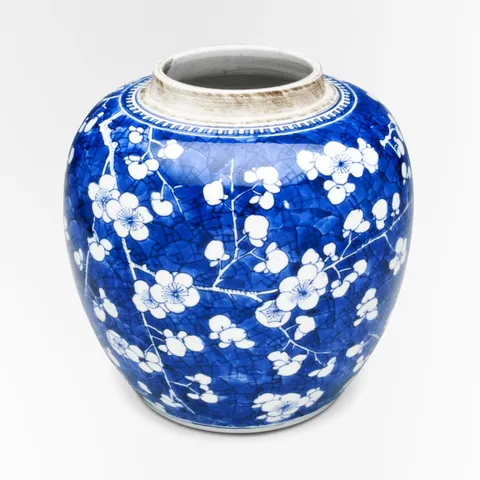
Blossom Ginger Jar$164
Live values
Move over a piece and its card tilts toward your pointer, with a soft light under it that follows.
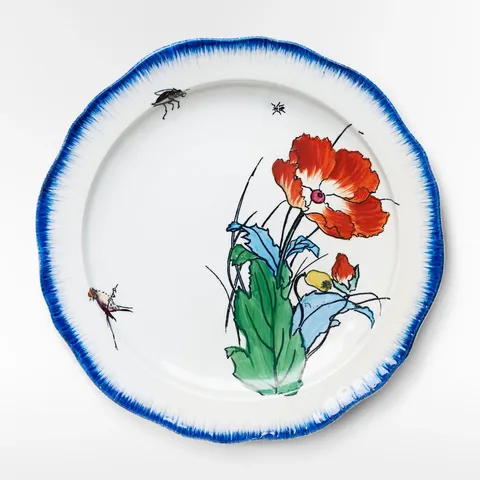
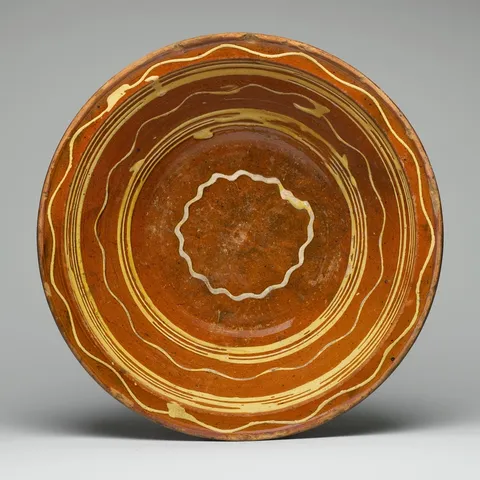
Reduced motion: The cards don't tilt, and the light is where the pointer is, without the spring. It still comes on and goes off.
A card that answers the pointer feels like an object: tilting toward where you point, with a light where your pointer is, it invites a closer look without a single extra control.
The pointer's place over the card, from -1 to 1 each way, is two signals that two createSprings follow, so the card eases toward the pointer and back to rest when it leaves. createTransform maps the springs twice: to rotateX and rotateY in the card's style, and to where its light sits, as custom properties the stylesheet's radial gradient reads. The light comes on through a variant that animates a custom property of its own, --light, from 0 to 1 under hover.
The card hears its hover from Wardic. On Solid 2, its ward is made beside the effects that read it and given to the element through wardRef. It only listens (ward()): the card's own props light it and tilt it. An effect over card.when("hover") hears the pointer over the card, from where it came in and at each move, with the card it's over (element, so no ref), and places the light and the tilt; one over card.when("hoverEnd") sends the card back flat. A hover at each move is Wardic's own: Motion's hover has only a start and an end. On Solid 1, the element's onHoverStart and onHoverEnd do the same, with its own pointermove for the moves in between. Touch never hovers, so on a phone the cards stay still.
Motion's version hears the pointer through the card's onPointerMove, skipping a finger by its pointerType, and eases it back with onHoverEnd. Solid 2 hears it through the card's ward, when("hover") with the point and the card, and when("hoverEnd"); Solid 1 through onHoverStart and onHoverEnd and the element's pointermove. The springs and transforms are the same, and the light's place is a custom property in both, though Motion's style type doesn't name custom properties: its version casts.
import { PRODUCTS } from "@wardic/example-storefront-shared/catalog"
import { formatPrice } from "@wardic/example-storefront-shared/format"
import { photoOf, srcsetOf } from "@wardic/example-storefront-shared/images"
import type { Product } from "@wardic/example-storefront-shared/server"
import { createSpring, createTransform, wardic, type WardicPoint } from "@wardic/solid"
import { createSignal, For } from "solid-js"
import { useReducedMotion } from "~/lib/preferences.tsx"

const SHELF = PRODUCTS.filter((product) => ["poppy-plate", "blossom-jar", "slip-dish"].includes(product.id))

/** How far a card tilts toward the pointer at its edge, in degrees. */
const TILT = 8

// Under the pointer the card's light comes on: a custom property the stylesheet's glow reads.
const card = {
  rest: { "--light": 0 },
  lit: { "--light": 1 },
} as const

export default function Spotlight() {
  return (
    <ul class="spot-grid">
      <For each={SHELF}>{(product) => <SpotCard product={product} />}</For>
    </ul>
  )
}

function SpotCard(props: { readonly product: Product }) {
  const reduced = useReducedMotion()
  // Where the pointer is over the card, from -1 to 1 across and down: 0, 0 at its centre, and when it leaves.
  const [across, setAcross] = createSignal(0)
  const [down, setDown] = createSignal(0)
  const springAcross = createSpring(across, { stiffness: 260, damping: 22 })
  const springDown = createSpring(down, { stiffness: 260, damping: 22 })
  // The card turns toward the pointer; the light sits under it. Under reduced motion, no tilt.
  const tilt = (degrees: number) => (at: number) => {
    if (reduced()) return 0
    return at * degrees
  }
  const rotateY = createTransform(springAcross, tilt(TILT))
  const rotateX = createTransform(springDown, tilt(-TILT))
  const lightX = createTransform(springAcross, [-1, 1], ["0%", "100%"])
  const lightY = createTransform(springDown, [-1, 1], ["0%", "100%"])

  let el!: HTMLElement
  // A point in the viewport, as a place on the card.
  const place = (point: WardicPoint) => {
    const box = el.getBoundingClientRect()
    const atAcross = ((point.x - box.left) / box.width) * 2 - 1
    const atDown = ((point.y - box.top) / box.height) * 2 - 1
    setAcross(atAcross)
    setDown(atDown)
    // Under reduced motion the light doesn't glide either: it's where the pointer is.
    if (reduced()) {
      springAcross.jump(atAcross)
      springDown.jump(atDown)
    }
  }

  const photo = photoOf(props.product.id)
  return (
    <li>
      <wardic.article
        class="spot-card"
        variants={card}
        initial="rest"
        animate="rest"
        whileHover="lit"
        style={{ rotateX, rotateY, "--light-x": lightX, "--light-y": lightY }}
        ref={el}
        // Its hover: the light starts where the pointer came in, and when the pointer leaves, the
        // card eases back flat.
        onHoverStart={(_event, start) => place(start.point)}
        onHoverEnd={() => {
          setAcross(0)
          setDown(0)
        }}
        // The moves in between: a hover tells its start and end, as Motion's does, not each move.
        // Touch never hovers, so a finger moves nothing.
        onPointerMove={(event) => {
          if (event.pointerType !== "touch") place({ x: event.clientX, y: event.clientY })
        }}
      >
        <div class="photo">
          <img src={photo.small} srcset={srcsetOf(photo)} sizes="(max-width: 640px) 100vw, 240px" width={photo.width} height={photo.height} alt={props.product.name} />
        </div>
        <div class="line">
          <span class="name">{props.product.name}</span>
          <span class="price">{formatPrice(props.product.price)}</span>
        </div>
      </wardic.article>
    </li>
  )
}
"use client"
import { PRODUCTS } from "@wardic/example-storefront-shared/catalog"
import { formatPrice } from "@wardic/example-storefront-shared/format"
import { photoOf, srcsetOf } from "@wardic/example-storefront-shared/images"
import type { Product } from "@wardic/example-storefront-shared/server"
import { type MotionStyle, motion, useMotionValue, useReducedMotionConfig, useSpring, useTransform } from "motion/react"
import type { PointerEvent } from "react"

const SHELF = PRODUCTS.filter((product) => ["poppy-plate", "blossom-jar", "slip-dish"].includes(product.id))

/** How far a card tilts toward the pointer at its edge, in degrees. */
const TILT = 8

// Under the pointer the card's light comes on: a custom property the stylesheet's glow reads.
const lighting = {
  rest: { "--light": 0 },
  lit: { "--light": 1 },
} as const

export default function Spotlight() {
  return (
    <ul className="spot-grid">
      {SHELF.map((product) => (
        <SpotCard key={product.id} product={product} />
      ))}
    </ul>
  )
}

function SpotCard({ product }: { readonly product: Product }) {
  // The system's setting, or the header's switch (`MotionConfig`).
  const reduced = useReducedMotionConfig()
  // Where the pointer is over the card, from -1 to 1 across and down: 0, 0 at its centre.
  const across = useMotionValue(0)
  const down = useMotionValue(0)
  const springAcross = useSpring(across, { stiffness: 260, damping: 22 })
  const springDown = useSpring(down, { stiffness: 260, damping: 22 })
  // The card turns toward the pointer; the light sits under it. Under reduced motion, no tilt.
  const tilt = (degrees: number) => (at: number) => {
    if (reduced) return 0
    return at * degrees
  }
  const rotateY = useTransform(springAcross, tilt(TILT))
  const rotateX = useTransform(springDown, tilt(-TILT))
  const lightX = useTransform(springAcross, [-1, 1], ["0%", "100%"])
  const lightY = useTransform(springDown, [-1, 1], ["0%", "100%"])

  // The pointer over the card places the light and the tilt; when it leaves, the card eases back
  // flat. A finger's pointer moves too, but touch never hovers: it moves nothing.
  const place = (event: PointerEvent<HTMLElement>) => {
    if (event.pointerType === "touch") return
    const box = event.currentTarget.getBoundingClientRect()
    const atAcross = ((event.clientX - box.left) / box.width) * 2 - 1
    const atDown = ((event.clientY - box.top) / box.height) * 2 - 1
    across.set(atAcross)
    down.set(atDown)
    // Under reduced motion the light doesn't glide either: it's where the pointer is.
    if (reduced) {
      springAcross.jump(atAcross)
      springDown.jump(atDown)
    }
  }
  const reset = () => {
    across.set(0)
    down.set(0)
  }

  const photo = photoOf(product.id)
  return (
    <li>
      <motion.article
        className="spot-card"
        variants={lighting}
        initial="rest"
        animate="rest"
        whileHover="lit"
        onPointerMove={place}
        onHoverEnd={reset}
        // Motion sets a custom property from a motion value, but its style type doesn't name them.
        style={{ rotateX, rotateY, "--light-x": lightX, "--light-y": lightY } as MotionStyle}
      >
        <div className="photo">
          <img src={photo.small} srcSet={srcsetOf(photo)} sizes="(max-width: 640px) 100vw, 240px" width={photo.width} height={photo.height} alt={product.name} />
        </div>
        <div className="line">
          <span className="name">{product.name}</span>
          <span className="price">{formatPrice(product.price)}</span>
        </div>
      </motion.article>
    </li>
  )
}